Google Gemini Neon Girl AI Photo Editing Prompts: These days, different kinds of posts and videos are going viral on YouTube, Instagram, and other social media platforms — and one of the biggest trends among them is Google Gemini Neon Girl AI Photo Editing Prompts. Have you ever thought about having a dreamy, neon-lit girl appear beside you in your photo? Now it’s possible — with just a few clicks.
In these viral edits, a glowing neon-colored “AI girl” appears next to you in the picture, giving the entire photo an emotional, movie-like feel. The effect looks incredibly creative and realistic. Creators on Instagram, TikTok, and YouTube are going crazy over this effect — one blog even calls it the “Glowing Girlfriend AI Photo Editing” trend that is “rapidly going viral on social media.”

The best part? With Google Gemini AI, you can create these edits yourself — without any special skills. In this guide, we’ll explain what Neon Girl Prompts are and how you can use them to create your own stunning photos and videos.
Details About Google Gemini Neon Girl AI Photo Editing Prompts
This editing trend starts with a normal photo (often one with soft neon lighting). Then, AI adds a glowing “neon girl” beside you in the image.
The Neon Girl prompt tells Gemini to insert a light-formed female figure into your photo.
Because of this, the entire picture starts to look like a sci-fi romantic scene —
like neon city lights, a moonlit forest path, and a softly glowing girl standing next to you — maybe holding a rose or gently touching your hand.
For example, one popular prompt says: “A young man lies on his bed at night, the room glowing with neon blue and pink lights… Beside him stands the glowing spirit of an Indian girl, her body emitting a gentle golden-white aura. She looks at him lovingly, with her hand resting softly on his cheek… The whole room is quiet, filled with emotion and nostalgia.”
This perfectly captures the dream-like, emotional atmosphere that Gemini AI creates.
In simple words, AI transforms your photo into a romantic, cinematic moment.
Your Face Stays the Same — Only the Scene Changes
Gemini can keep your face exactly the same in the photo, as long as you mention this in the prompt.
One tutorial especially recommends:
➡️ Use a clear, sharp face photo
➡️ So the AI can match your features properly
When you use a Neon Girl prompt, the final result looks highly realistic —
You still look like yourself, and the AI-generated neon girl blends naturally into the scene.
That’s why Google Gemini Neon Girl AI Photo Editing Prompts have become such a huge trend on social media.

Top 5 Google Gemini Neon Girl AI Photo Editing Prompts
Prompt: 1 Google Gemini Neon Girl AI Photo Editing Prompts

A young Indian man rests peacefully on his bed late at night, wearing dark and comfortable nightwear. The entire room is softly illuminated with a dreamy glow of neon blue and pink ambient lights, creating a cinematic, emotional, and slightly futuristic mood. Beside him, the spirit of a beautiful Indian girl appears — glowing gently with a magical, golden-white aura. Her presence feels soft, pure, and emotional, as if she is made of light. She stands close to the man, leaning toward him with affection. Her expression is full of love and longing, and her hand gently rests on his cheek as if she’s trying to comfort and stay connected to him. The man remains asleep, unaware yet emotionally connected — a single tear falling from the corner of his eye, showing the silent bond between the living and the memory. The room feels silent, calm, nostalgic, and emotional — filled with love, loss, and connection. The environment includes soft shadows, blurred background elements, and a dreamy depth-of-field effect to make the moment look magical and photo-realistic.
Prompt: 2 Google Gemini Neon Girl AI Photo Editing Prompts

A young man sits alone on a park bench at night while gentle rain falls around him. He holds his head in his hand, expressing a deep emotional moment or thoughtful reflection. His face and hairstyle must remain 100% identical to the reference image — realistic skin texture, natural lighting, and no changes. Behind him, a glowing holographic figure of a girl appears — soft, warm, and ethereal in style, like a futuristic projection made of light. She gently places her hand on his shoulder, creating a comforting and supportive gesture. Her presence feels emotional, calm, and meaningful, symbolizing connection, hope, and inner strength. Soft street lights glow in the background, creating a beautiful blurred bokeh effect. The rainy atmosphere enhances the scene with reflective wet surfaces, subtle mist, cinematic shadows, and dramatic lighting. The overall mood is emotional, quiet, and visually artistic — blending realism with a soft dreamlike aesthetic.
Prompt: 3 Google Gemini Neon Girl AI Photo Editing Prompts
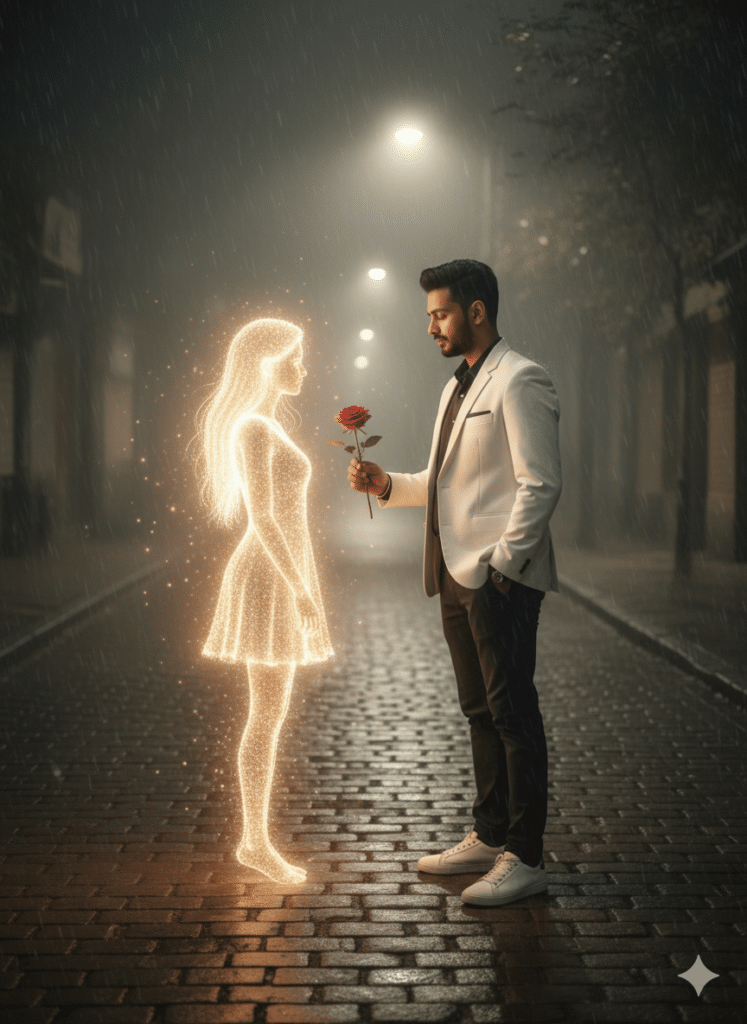
A slender Indian man (keep my face 100% accurate as the reference image) stands on a foggy, dimly lit street at night. He is holding a single red rose in his hand, offering it gently forward with a soft emotional expression. He is wearing a white blazer, black pants, and clean white sneakers — modern, classy, and minimal. In front of him appears a glowing female hologram — a beautiful, softly illuminated digital figure formed from floating light particles. She has long flowing hair made of light and a soft white glow that blends naturally into the misty atmosphere. Her presence feels dreamy, gentle, and artistic — like a surreal, futuristic vision. The street around them is covered in light fog, with subtle reflections on wet cobblestones creating depth and realism. Dim streetlights cast warm highlights and long soft shadows, making the scene cinematic, emotional, and visually poetic. The entire moment feels like a blend of reality and imagination — calm, meaningful, and beautifully aesthetic.
Prompt: 4 Google Gemini Neon Girl AI Photo Editing Prompts
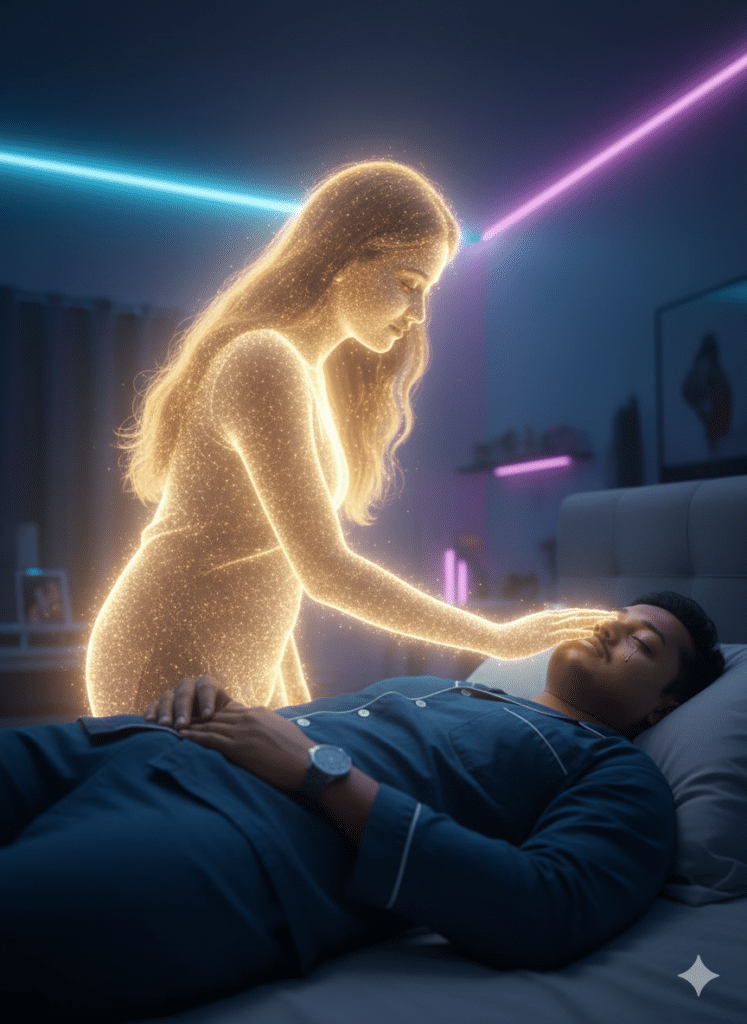
A young Indian man is lying peacefully on his bed late at night, dressed in dark and comfortable night clothes. The environment around him feels calm, intimate, and emotional. Soft neon blue and pink lights gently illuminate the room, creating a dreamy, moody, and cinematic atmosphere with a futuristic yet emotional tone. Beside him stands the glowing spirit of a beautiful Indian girl. Her form is delicate yet ethereal, and her entire body radiates a gentle golden-white aura, giving her the appearance of a soft, luminous angelic presence. Her expression is warm, emotional, and filled with love and longing. She gently rests her hand on the man’s cheek as if protecting him, comforting him, and silently expressing deep affection. The young man remains asleep, unaware of her physical presence but emotionally connected to her memory. A single tear slowly rolls down the side of his face, symbolizing longing, love, loss, and connection—showing he can feel her energy and soul even though he cannot see her. The room remains quiet, dim, and filled with nostalgia, emotion, and storytelling depth. Soft shadows, beautiful contrast, cinematic lighting, shallow depth of field, and a dreamy glow complete the scene, making it look highly realistic, emotional, and artistic.
Prompt: 5 Google Gemini Neon Girl AI Photo Editing Prompts
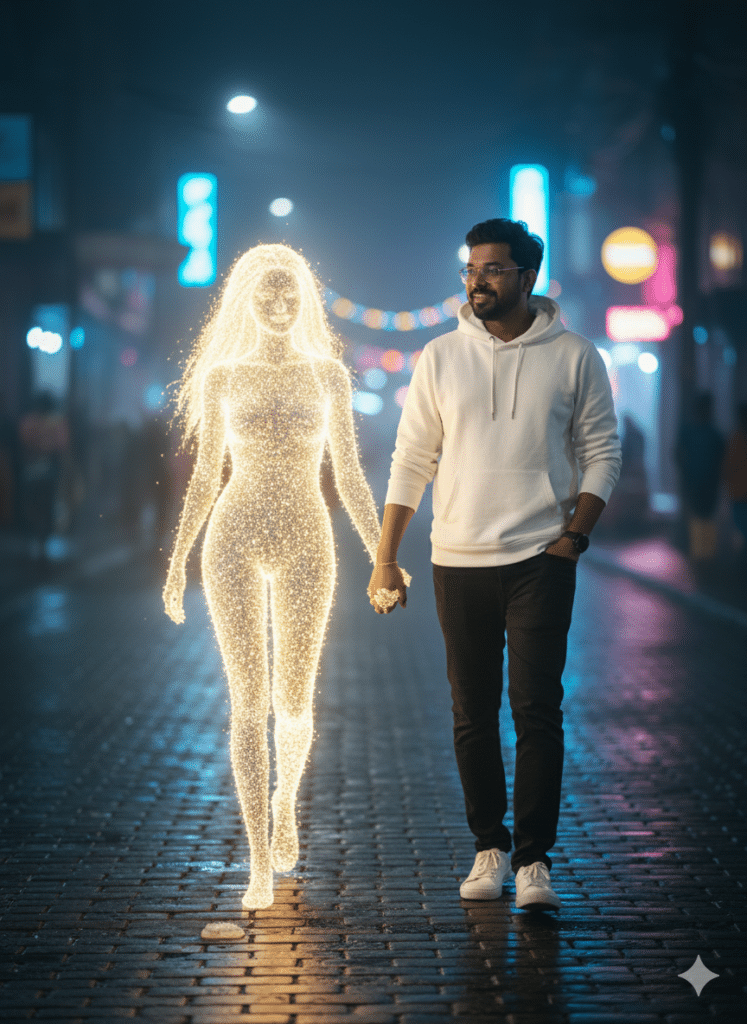
A young Indian man is walking along a calm, dreamy street at night. The road is slightly reflective, showing soft neon lights from distant buildings and blurred city bokeh. He is wearing a white hoodie, black jeans, and clean white sneakers, giving him a modern and casual look. Beside him walks a glowing neon-style girl, created in a beautiful golden light illustration style — like a futuristic hologram or AI-generated digital companion. Her soft golden glow casts warm reflections on the street and subtly lights up the edges of the man’s hoodie. The man gently holds her hand while walking, creating a sense of connection and warmth. The atmosphere feels calm, artistic, slightly surreal, and cinematic — blending fantasy with realism. The lighting is soft, moody, and visually aesthetic, with detailed textures, realistic shadows, and smooth highlights. The background remains lightly blurred to keep focus on the characters.
How to Create These Photos
Follow these steps to make your own Gemini Neon Girl image:
- Open Google Gemini AI.
Go to the Gemini AI app or website (it’s free with your Google account). - Upload a clear and good-quality photo.
Use a high-quality, well-lit selfie. Make sure your face is fully visible so Gemini can match it properly. A simple background works best, so the neon effect stands out more. - Write or paste your prompt.
Describe the scene using keywords like “neon,” “glowing,” “cinematic,” etc. You can also use any viral Neon Girl prompts. For example, one guide suggests:
“Create an ultra-realistic picture of a young man walking alone on a dimly lit path at night… Beside him, there is a glowing golden neon girl holding a bouquet of red roses… The overall atmosphere should feel calm and slightly melancholic.”
You can change the colors, clothes, background, and other details as per your liking.
- Generate the image.
Paste your prompt in Gemini and then upload your photo. Click on “Generate.” According to one tutorial, you just have to do this:
“Paste the prompt, then use the plus option to upload your photo… After that, click Generate, and your cool photo is ready.” - Adjust the quality (optional).
If Gemini gives the option, set the resolution to high (4K or 8K). You can also try changing the settings and generating again to make the colors sharper and clearer. - Download the final image.
Save your finished photo. You’ll see yourself in a neon-lit scene along with an AI-generated glowing girl—exactly as described in your prompt.
That’s it! Your photo is ready. Now try different experiments—
Change the neon colors (blue, pink, green, etc.), switch backgrounds (city, forest, room), or try different poses. The clearer your prompt is, the better your results will be.
Conclusion
With Google Gemini Neon Girl AI photo editing prompts, anyone can easily create attractive and glowing neon-style images. Even beginners can turn a simple photo into a neon fantasy scene using these prompts. The process has become so easy that you only need Gemini AI (for photos) and an AI animator (for videos).
Always remember:
- Use a clear, sharp photo
- Write a detailed prompt
- Clearly mention the colors, lighting, and mood you want
The rest will be handled by AI. By 2025, tools like Gemini and Flow have made creative editing accessible to everyone, so don’t hesitate to experiment. The more you play with prompts and settings, the better results you’ll get.
In short, Google Gemini Neon Girl AI photo editing prompts let you join the viral trend of neon-lit fantasy portraits. Definitely give it a try—maybe your glowing Neon Girl picture will be the next one to go viral on social media!
Declaration
etime.in is not affiliated with any government agency, official department, or authority. The information provided in this post/website is for informational purposes only. We are not answerable for any damages or errors related to the use of our content. Aspirants should always verify the information directly from the official website or notification before taking any action.